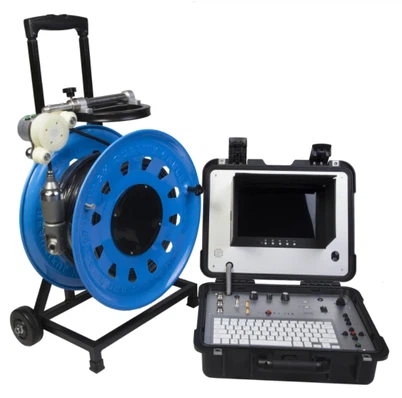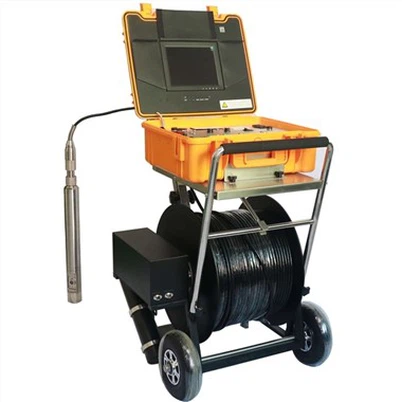

How to troubleshoot a pipe camera?
Leave a message

Hey there! As a pipe camera supplier, I've seen my fair share of issues when it comes to these nifty gadgets. Pipe cameras are super useful for checking out what's going on inside pipes, boreholes, and all sorts of tight spaces. But like any piece of tech, they can run into problems. In this blog, I'm gonna share some tips on how to troubleshoot a pipe camera.
1. Camera Not Turning On
One of the most common issues is when the camera just won't turn on. First things first, check the power source. Is the battery charged? If it's a rechargeable battery, try plugging it in and see if the charging indicator lights up. Sometimes, the battery might be completely drained, so give it a good charge for a few hours.
If you're using an external power supply, make sure it's properly connected. Check the cables for any signs of damage, like frayed wires or loose connections. If you find any issues with the cables, replace them.
Another thing to check is the power switch. Sometimes, it can get stuck or malfunction. Try toggling the switch a few times to see if that does the trick. If the switch seems broken, you might need to contact the manufacturer for a replacement.
2. Poor Image Quality
A blurry or pixelated image can be really frustrating, especially when you're trying to get a clear view of what's inside the pipe. One possible cause is a dirty lens. Over time, dirt, dust, and debris can accumulate on the lens, affecting the image quality.


To clean the lens, use a soft, lint - free cloth. Gently wipe the lens in a circular motion. Avoid using harsh chemicals or abrasive materials, as they can scratch the lens.
If the image is still blurry after cleaning the lens, it could be a problem with the camera settings. Check the focus settings on the camera. Some pipe cameras have manual focus, so you might need to adjust it to get a sharp image.
Also, make sure the lighting is adequate. Poor lighting can make the image look dark and grainy. Most pipe cameras come with built - in lights. Check if the lights are working properly. If not, the bulbs might need to be replaced.
3. Cable Issues
The cable that connects the camera to the control unit is crucial. If there are problems with the cable, it can disrupt the signal and cause all sorts of issues.
Inspect the cable for any cuts, kinks, or breaks. Even a small cut can affect the signal transmission. If you find a damaged cable, you'll need to replace it. It's important to use a cable that is compatible with your pipe camera.
Another issue with the cable can be signal interference. If you're using the camera in an area with a lot of electrical equipment, the electromagnetic fields can interfere with the signal. Try moving the camera and the control unit away from any sources of interference.
4. Software and Connectivity Problems
Many modern pipe cameras come with software that allows you to view and record the footage on a computer or a mobile device. If you're having trouble connecting the camera to your device, there are a few things you can try.
First, make sure you have the latest version of the software installed. Outdated software can cause compatibility issues. Check the manufacturer's website for software updates.
If you're using a wireless connection, make sure the camera and the device are within range. Also, check the Wi - Fi settings on both the camera and the device. Try restarting both the camera and the device to refresh the connection.
If you're using a wired connection, make sure the cable is properly plugged in. Sometimes, a loose connection can prevent the camera from communicating with the device.
5. Overheating
Pipe cameras can overheat, especially if they are used for long periods of time. Overheating can cause the camera to shut down or malfunction.
If you notice that the camera is getting hot, give it a break. Turn it off and let it cool down for a while. Make sure the camera is in a well - ventilated area when in use. Avoid covering the ventilation ports on the camera, as this can trap heat.
Also, check if there are any obstructions around the camera that could be blocking the airflow. If the overheating problem persists, it could be a sign of a more serious issue, and you should contact the manufacturer.
6. Borehole - Specific Issues
If you're using a Borehole Inspection Camera or a Factory Borehole Water Well Camera or a Borehole Deep Water Inspection Camera, there are some additional issues to watch out for.
The pressure in a borehole can be much higher than normal, which can affect the camera. Make sure the camera is rated for the depth and pressure of the borehole you're using it in. If the camera is not rated for high - pressure environments, it could get damaged.
Also, the water in a borehole can be dirty and full of sediment. This can quickly dirty the lens and affect the image quality. Consider using a camera with a self - cleaning mechanism or a protective cover for the lens.
Conclusion
Troubleshooting a pipe camera might seem daunting at first, but with a little patience and some basic knowledge, you can often solve the problems on your own. Remember to always follow the manufacturer's instructions when performing any maintenance or repairs.
If you've tried all the troubleshooting steps and still can't get the camera to work properly, don't hesitate to reach out to us. As a pipe camera supplier, we have a team of experts who can help you diagnose and fix the problem.
Whether you're in need of a replacement part, a new camera, or just some technical advice, we're here to assist you. We offer high - quality pipe cameras at competitive prices, and our customer service is top - notch. So, if you're in the market for a pipe camera or need help with your existing one, contact us for a purchase or to discuss your requirements.
References
- Manufacturer's user manuals for pipe cameras
- Industry best practices for pipe camera maintenance and troubleshooting