
How do I use the zoom function of a snake camera?
Leave a message

As a snake camera supplier, I'm frequently asked about the various functions of our products, and one of the most commonly inquired features is the zoom function. In this blog post, I'll provide a comprehensive guide on how to effectively use the zoom function of a snake camera, unlocking its full potential for detailed inspections.
Getting Familiar with the Snake Camera
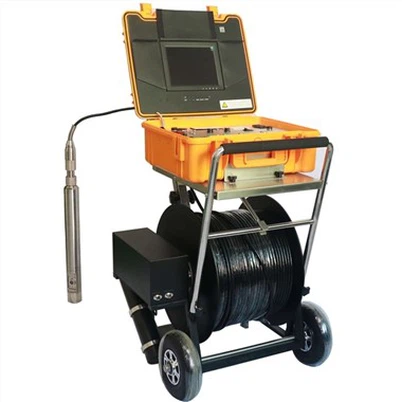
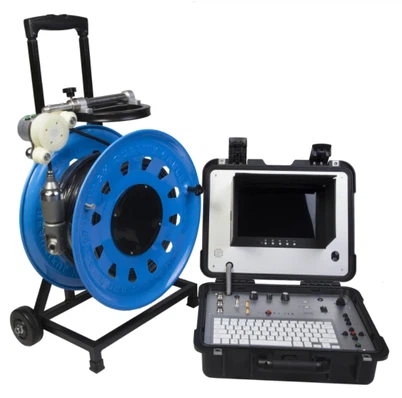
Before delving into the zoom function, it's essential to understand the basics of a snake camera. These cameras, also known as drain cameras or pipe inspection cameras, are designed to navigate through tight spaces such as pipes, ducts, and other confined areas. They consist of a long, flexible cable with a camera at one end and a display unit at the other. The camera captures high - resolution images and videos, which are then transmitted to the display for real - time viewing.
Our company offers a wide range of snake cameras to meet different needs. For instance, the Waterproof CCTV Drain Camera is specifically designed for underwater inspections, ensuring reliable performance even in wet conditions. The 13 Inch Screen Pipe Sewer Camera provides a large, clear display for easy viewing of inspection results. And the 360 degree rotating AHD pipe sewer inspection camera offers a full - view inspection, allowing users to examine every angle of the target area.
Locating the Zoom Function
The location of the zoom function may vary depending on the model of the snake camera. In most cases, the zoom controls are located on the display unit. You might find buttons labeled "Zoom In" and "Zoom Out," or a zoom lever that you can slide forward or backward. Some advanced models also support touch - screen zooming if the display is a touch - screen device.
Once you've powered on the snake camera and inserted the cable into the area you want to inspect, you can start looking for the zoom controls. Refer to the user manual if you're having trouble finding them, as it typically provides detailed diagrams and instructions specific to your model.
Using the Zoom Function
Zoom In
The "Zoom In" function is used when you need to examine a particular detail more closely. For example, if you're inspecting a pipe and notice a small crack or a buildup of debris, you can use the zoom function to get a better look.
To zoom in, simply press the "Zoom In" button or move the zoom lever forward. As you do this, the image on the display will gradually magnify, bringing the target area into sharper focus. Keep in mind that as you zoom in, the field of view will decrease. This means you'll see a smaller portion of the overall area, but the details within that portion will be more visible.
It's important not to over - zoom. If you zoom in too much, the image may become pixelated or blurry, making it difficult to accurately assess the situation. A good practice is to zoom in gradually and stop when you've achieved the level of detail you need.
Zoom Out
The "Zoom Out" function is the opposite of zoom in. It's used to get a broader view of the area. After you've zoomed in to examine a specific detail, you may want to zoom out to see how that detail relates to the larger context.


To zoom out, press the "Zoom Out" button or move the zoom lever backward. The image on the display will then shrink, and the field of view will increase. This allows you to see more of the surrounding area and get a better understanding of the overall condition of the inspected space.
Tips for Using the Zoom Function Effectively
Lighting
Proper lighting is crucial when using the zoom function. Since the snake camera often operates in dark environments such as pipes or crawl spaces, the built - in lights on the camera head play a vital role in ensuring clear images. When you zoom in, the light may be concentrated on a smaller area, so you might need to adjust the lighting intensity. Some snake cameras allow you to control the brightness of the lights, which can help you get well - lit and sharp images even when zoomed in.
Stability
To obtain clear and steady images while zooming, it's important to keep the snake camera cable as stable as possible. Any movement of the cable can cause the image to shake, especially when zoomed in. Try to secure the cable or use a support device if available. This will minimize blurring and ensure that you can accurately inspect the details.
Documentation
When using the zoom function, it's a good idea to document your findings. Most snake cameras come with recording and snapshot features. Take screenshots or record videos of the zoomed - in images to keep a record of the details you've observed. This documentation can be useful for reporting, analysis, and future reference.
Troubleshooting the Zoom Function
Sometimes, you may encounter issues with the zoom function. Here are some common problems and their solutions:
Image Blurring
If the image becomes blurry when you zoom in, it could be due to over - zooming, poor lighting, or camera movement. Try reducing the zoom level, adjusting the lighting, or stabilizing the cable to see if the problem resolves.
Non - Responsive Zoom Controls
If the zoom buttons or lever don't seem to be working, check the power connection of the display unit and the camera. Sometimes, a loose connection can cause the controls to malfunction. You can also try resetting the camera by turning it off and on again. If the problem persists, contact our customer support team for further assistance.
Conclusion
The zoom function of a snake camera is a powerful tool that can significantly enhance the inspection process. By allowing you to examine details more closely and get a broader view of the area, it provides valuable insights that can help you make informed decisions. Whether you're a professional plumber, an electrician, or a DIY enthusiast, mastering the use of the zoom function will make your inspections more efficient and accurate.
If you're interested in purchasing a high - quality snake camera with an excellent zoom function or have any questions about our products, we invite you to contact us for procurement and negotiation. Our team of experts is ready to assist you in finding the perfect solution for your needs.
References
- User manuals of our snake camera products
- Industry best practices for pipe and duct inspections