
How do I change the settings on a pipe camera?
Leave a message

Hey there! As a pipe camera supplier, I often get asked about how to change the settings on a pipe camera. It's not as complicated as it might seem at first glance, and in this blog, I'll walk you through the whole process step by step.
Why You Might Need to Change Settings
Before we jump into the nitty - gritty of how to change the settings, let's talk about why you might need to do so. Sometimes, the default settings of a pipe camera aren't suited for the specific job you're doing. For example, if you're working in a dark sewage pipe, you'll probably need to adjust the brightness and contrast settings to get a clear view. Or, if the pipe is very long and you're using a Flexible Cable Industrial Borehole Camera, you might want to change the focus to make sure you can see details at different distances.


Getting Familiar with Your Pipe Camera
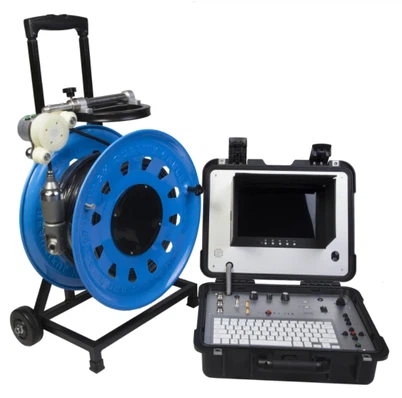
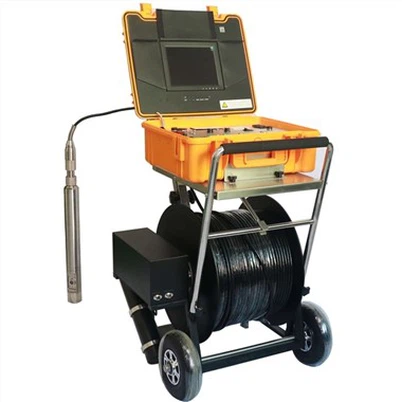
The first step in changing the settings of your pipe camera is to get familiar with the device itself. Every pipe camera is a bit different, but most of them have a control panel either on the camera unit or on the connected monitor. The control panel usually has a bunch of buttons or a touch - screen interface. Take some time to read the user manual that comes with your camera. It'll tell you what each button or function on the panel does.
Changing the Brightness and Contrast
One of the most common settings you'll need to change is the brightness and contrast. In low - light environments, the image can look too dark, so increasing the brightness is a must. On the other hand, if the area is very bright, the image might be overexposed, and you'll need to decrease the brightness.
To change these settings, look for the buttons labeled "Brightness" and "Contrast" on your control panel. Press the button and then use the up and down arrows to increase or decrease the levels. You can also use the touch - screen if your camera has one. Just tap on the brightness or contrast icon and use your finger to slide the bar up or down. Keep adjusting until you get an image that looks clear and well - defined.
Adjusting the Focus
Focus is crucial when inspecting pipes. You might want to focus on a small crack, a buildup of debris, or the inner walls of the pipe. To adjust the focus, look for the "Focus" button on your control panel.
Some pipe cameras have autofocus, which is great for quick inspections. But if you want more control, switch to manual focus. With manual focus, you'll have to use the focus adjustment buttons to bring the object into sharp view. It might take a few tries to get it right, especially if you're dealing with a complex pipe structure.
Changing the Color Temperature
The color temperature setting can greatly affect the way the image looks. In different pipe environments, the color of the light can vary. For instance, in a metal pipe, the light might have a bluish tint, while in a plastic pipe, it could be more yellowish.
To change the color temperature, find the "Color Temperature" button on your control panel. You'll usually have options like "Cool," "Warm," or a range of numbers. Select the appropriate setting based on the lighting conditions in the pipe. This can often make the image more accurate and easier to analyze.
Resolution and Image Quality
If you want to capture high - quality images or videos for your inspection reports, you might need to adjust the resolution. Higher resolution means more details in the image, but it also takes up more storage space.
Look for the "Resolution" or "Image Quality" option on your control panel. You'll typically have choices like 720p, 1080p, or even higher on some advanced cameras. Consider the purpose of your inspection. If you just need a quick look, lower resolution might be fine. But for detailed reports or legal documentation, go for the highest resolution your camera can offer.
Exploring Advanced Settings
Some pipe cameras come with advanced settings that can really enhance your inspection experience. For example, Borewell Inspection Camera and Factory Borehole Water Well Camera models often have features like image stabilization, zoom, and measurement tools.
Image stabilization can help reduce blurring, especially if the camera is moving around in the pipe. The zoom function allows you to get a closer look at specific areas without having to physically move the camera. And measurement tools can be very useful for determining the size of cracks or the diameter of the pipe.
To access these advanced settings, look for a "Menu" or "Advanced" button on your control panel. Navigate through the menu using the arrow keys or the touch - screen to find the features you want to use.
Troubleshooting Settings Changes
Sometimes, you might run into issues when changing the settings. Maybe the image doesn't look right even after adjusting the brightness, or the focus won't stay in place. If you encounter problems like these, first check the user manual. It usually has a troubleshooting section that can help you identify and fix common issues.
If the problem persists, try resetting the camera to its default settings. This can often solve problems that are caused by incorrect settings. Look for a "Reset" button on your control panel. After resetting, you can start adjusting the settings again from scratch.
Conclusion and Invitation to Purchase
Changing the settings on a pipe camera is an important skill for anyone who uses these devices for inspections. By knowing how to adjust the brightness, contrast, focus, color temperature, and other settings, you can get clear and accurate images that will help you make better decisions.
If you're in the market for a new pipe camera or need advice on choosing the right one, don't hesitate to reach out. As a pipe camera supplier, I'm here to help you find the perfect solution for your needs. Whether it's a Borewell Inspection Camera, Factory Borehole Water Well Camera, or Flexible Cable Industrial Borehole Camera, I have a wide range of products to offer. Let's have a chat about your requirements and see how I can assist you.
References
- Pipe Camera User Manuals
- Industry Standards for Pipe Inspections