
How do I align the camera of a pipe camera correctly?
Leave a message

Hey there! As a supplier of pipe cameras, I know how crucial it is to align the camera correctly. A well - aligned pipe camera can provide clear and accurate images, which are essential for effective pipe inspections. In this blog, I'll share some tips on how to align the camera of a pipe camera correctly.
Why Correct Alignment Matters
First off, let's talk about why getting the alignment right is so important. When you're inspecting pipes, you need to see every detail clearly. Misaligned cameras can lead to distorted images, blind spots, and inaccurate assessments. For example, if you're trying to detect cracks or blockages in a pipe, a misaligned camera might miss these critical issues. This can result in incorrect diagnoses and potentially costly repairs down the line.
Pre - Inspection Checks
Before you start aligning the camera, there are a few pre - inspection checks you should do. First, make sure the camera is clean. Dirt, dust, or debris on the lens can significantly affect the image quality. Use a soft, lint - free cloth to clean the lens gently.
Next, check the camera's housing. Ensure that it's not damaged or cracked, as this could also impact the alignment and the overall performance of the camera. You should also test the camera's power supply. A weak or unstable power source can cause the camera to malfunction or produce poor - quality images.
Initial Setup
When you're setting up the pipe camera, start by choosing the right location for the control unit. The control unit is where you'll view the camera feed, so it should be in a place where you can easily see the screen and operate the controls.
Once you've set up the control unit, carefully lower the camera into the pipe. Make sure the cable is straight and not kinked. A kinked cable can cause the camera to tilt or twist, leading to misalignment.
Visual Alignment
One of the simplest ways to align the camera is through visual inspection. As the camera moves through the pipe, look at the image on the control unit's screen. If the image seems off - center or tilted, you can make adjustments.
Most pipe cameras have a feature that allows you to rotate the camera head. Use this feature to align the camera so that the image is centered and level. You can also adjust the camera's pitch and yaw to get the best view of the pipe's interior.
Using Laser Guides
Some of our advanced pipe cameras come with laser guides. These laser guides are a great tool for aligning the camera accurately. The lasers project a straight line onto the pipe's walls, which helps you ensure that the camera is centered and level.
To use the laser guides, turn them on and look at the image on the screen. Adjust the camera's position until the laser lines are straight and centered. This method provides a more precise alignment compared to visual inspection alone.
Calibration
Calibration is another important step in aligning the pipe camera. Calibration helps to ensure that the camera's sensors are working correctly and that the images are accurate. Most of our pipe cameras have a built - in calibration feature.
To calibrate the camera, follow the instructions in the user manual. Usually, it involves placing the camera in a known environment and adjusting the settings until the image matches the expected results. Calibration should be done regularly, especially if the camera has been dropped or exposed to extreme conditions.
Dealing with Obstacles
Sometimes, you might encounter obstacles in the pipe, such as bends or junctions. These obstacles can make it challenging to keep the camera aligned. When you reach a bend, slow down the camera's movement. Use the camera's rotation feature to adjust the view so that you can see around the bend clearly.
At junctions, you may need to stop the camera and carefully assess the situation. You can use the camera's zoom feature to get a better view of the junction and then align the camera to inspect each branch of the pipe.
Maintaining Alignment
Once you've aligned the camera correctly, it's important to maintain that alignment throughout the inspection. Keep an eye on the image on the screen and make small adjustments as needed. If the camera starts to drift or tilt, use the controls to realign it.
Also, be aware of the cable's movement. As the camera moves through the pipe, the cable can sometimes pull or push the camera, causing misalignment. Try to keep the cable tension consistent to minimize this effect.
Our Product Range
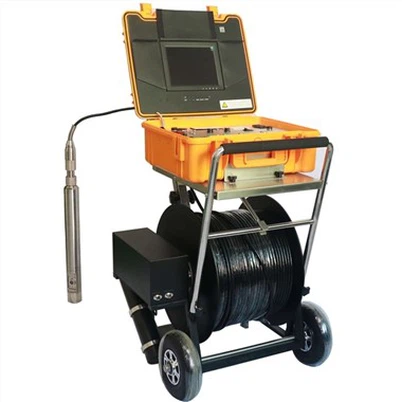
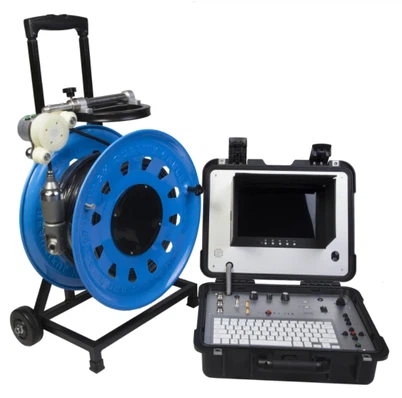
We offer a wide range of pipe cameras to suit different inspection needs. For example, our Underwater dual view borescope inspection camera is perfect for underwater pipe inspections. It provides a dual - view feature, which gives you a more comprehensive view of the pipe's interior.
Our Borewell Inspection Camera is designed specifically for borewell inspections. It has a high - resolution camera and a long - lasting battery, making it ideal for deep - borewell inspections.
If you need a camera for industrial applications, our Flexible Cable Industrial Borehole Camera is a great choice. The flexible cable allows the camera to navigate through complex pipe systems easily.


Conclusion
Aligning the camera of a pipe camera correctly is essential for accurate and effective pipe inspections. By following the steps I've outlined in this blog, you can ensure that your camera is well - aligned and provides clear, accurate images.
If you're in the market for a high - quality pipe camera or need more information on camera alignment, don't hesitate to reach out. We're here to help you with all your pipe inspection needs. Whether you're a professional inspector or a DIY enthusiast, our products and expertise can make your pipe inspections easier and more successful. Contact us today to start a discussion about your requirements and how our pipe cameras can meet them.
References
- Pipe Camera User Manuals
- Industry Best Practices for Pipe Inspections