

How do I adjust the focus of a snake camera?
Leave a message

As a seasoned supplier of snake cameras, I've witnessed firsthand the importance of proper focus adjustment in getting the most out of these versatile tools. Snake cameras, also known as borescopes or inspection cameras, are invaluable for inspecting hard-to-reach areas such as pipes, ducts, and machinery. In this blog post, I'll share my insights on how to adjust the focus of a snake camera effectively, ensuring clear and detailed images every time.
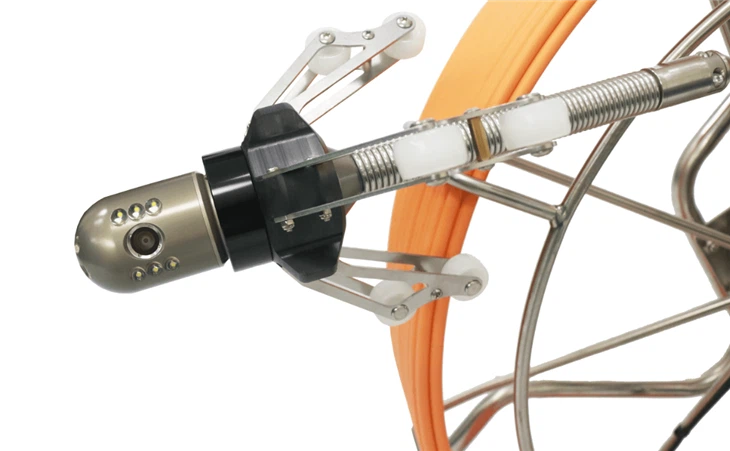

Understanding the Basics of Snake Camera Focus
Before diving into the adjustment process, it's essential to understand how focus works in a snake camera. Focus refers to the sharpness and clarity of the image captured by the camera. A well-focused image allows you to see details clearly, making it easier to identify issues such as cracks, blockages, or damage.
Most snake cameras come with adjustable focus settings, which can be controlled either manually or automatically. Manual focus gives you more control over the image, allowing you to fine-tune the focus according to your specific needs. Automatic focus, on the other hand, adjusts the focus automatically based on the distance between the camera and the subject.
Manual Focus Adjustment
Manual focus adjustment is ideal for situations where you need precise control over the image. Here's a step-by-step guide on how to adjust the focus manually:
- Power on the snake camera: Connect the camera to a power source and turn it on. Make sure the camera is properly calibrated and functioning correctly.
- Insert the camera into the inspection area: Carefully insert the snake camera into the area you want to inspect. Take your time to ensure that the camera is positioned correctly and that the lens is clean.
- Locate the focus adjustment control: Most snake cameras have a focus adjustment control, which is usually located on the camera body or the control unit. Refer to the user manual for your specific camera model to find the exact location of the focus adjustment control.
- Adjust the focus: Use the focus adjustment control to adjust the focus of the camera. Turn the control clockwise or counterclockwise to increase or decrease the focus, respectively. As you adjust the focus, observe the image on the monitor or display screen. Keep adjusting the focus until the image is sharp and clear.
- Fine-tune the focus: Once you have achieved a sharp image, you may need to fine-tune the focus further to get the best results. Use small, incremental adjustments to make minor changes to the focus. Pay attention to the details in the image and make sure that everything is in focus.
Automatic Focus Adjustment
Automatic focus adjustment is a convenient option for situations where you need quick and easy focus adjustment. Here's how to use automatic focus on a snake camera:
- Power on the snake camera: Connect the camera to a power source and turn it on. Make sure the camera is properly calibrated and functioning correctly.
- Insert the camera into the inspection area: Carefully insert the snake camera into the area you want to inspect. Take your time to ensure that the camera is positioned correctly and that the lens is clean.
- Activate the automatic focus mode: Most snake cameras have an automatic focus mode, which can be activated by pressing a button on the camera body or the control unit. Refer to the user manual for your specific camera model to find the exact location of the automatic focus button.
- Let the camera adjust the focus: Once you have activated the automatic focus mode, the camera will automatically adjust the focus based on the distance between the camera and the subject. Wait a few seconds for the camera to adjust the focus and then observe the image on the monitor or display screen.
- Check the focus: If the image is not sharp and clear, you may need to adjust the position of the camera or the subject to improve the focus. Try moving the camera closer to or farther away from the subject, or adjust the angle of the camera to get a better view.
Tips for Adjusting the Focus of a Snake Camera
Here are some additional tips to help you adjust the focus of a snake camera effectively:
- Use proper lighting: Good lighting is essential for getting clear and detailed images. Make sure the inspection area is well-lit, or use a built-in light source on the snake camera to illuminate the area.
- Clean the lens: A dirty or smudged lens can affect the focus and clarity of the image. Before using the snake camera, make sure to clean the lens with a soft, dry cloth.
- Adjust the camera position: Sometimes, adjusting the position of the camera can improve the focus. Try moving the camera closer to or farther away from the subject, or adjust the angle of the camera to get a better view.
- Use a tripod or stabilizer: If you need to take steady, focused images, consider using a tripod or stabilizer to hold the snake camera in place. This can help reduce camera shake and improve the clarity of the image.
- Practice makes perfect: Adjusting the focus of a snake camera takes practice. Don't be afraid to experiment with different focus settings and techniques to find what works best for you.
Conclusion
Adjusting the focus of a snake camera is an essential skill for anyone who uses these tools for inspection purposes. By following the tips and techniques outlined in this blog post, you can ensure that your snake camera captures clear and detailed images every time. Whether you're a professional inspector or a DIY enthusiast, taking the time to learn how to adjust the focus of your snake camera will help you get the most out of this valuable tool.
If you're in the market for a high-quality snake camera, we offer a wide range of products to meet your needs. Check out our Rotation Camera Pipe Inspection Camera 60M With HD DVR 16GB Sewer Drain Industrial Endoscope, Pipe Sewer Inspection Camera, and Two-way Video CCTV Color Inspection Camera for more information.
If you have any questions or need further assistance, please don't hesitate to contact us. We're here to help you find the right snake camera for your needs and provide you with the support and guidance you need to get the most out of your investment.
References
- Manufacturer's user manuals for snake cameras
- Industry best practices for snake camera inspection


